Quick answer
An AirTag usually keeps beeping because it has been away from its owner's iPhone for a while and someone is moving it: that sound is a safety feature, not a fault. It also chimes when it's set up, when the battery goes in and when someone taps Play Sound. If the beeping comes with a “Found Moving With You” alert on your phone, the tracker isn't yours, and there are clear steps to take. Below, the four stages in the order they happen, and what to do at each one.

Searches for “why does my AirTag keep beeping” and “why is my AirTag making noise” are rising fast in the US, and it's easy to see why: a chirp from a bag, a car or a coat pocket is confusing, sometimes unsettling. The good news is that trackers that work with Apple's Find My network make sounds for a short list of reasons, and they escalate in a predictable order. Once you know which stage you're in, you know what to do. (New to trackers? Start with how a card tracker works with Find My and Find Hub.)
Stage 1: sounds you (or the app) triggered
What you hear: a short chime when you insert or replace the battery or finish setup, or a longer melody when someone opens the Find My app and taps Play Sound.
Why it happens: these are normal confirmation and finding sounds. If another person in your home shares the item through Find My, they may be trying to locate it.
What to do: nothing, other than finding the item. Open Find My, select it and check the last location. If you just changed the battery, the chime means the tag is alive; our guide to checking a tracker after months in a drawer covers the rest.
Stage 2: “separated from its owner” and being moved
What you hear: a repeated chirp, often at random moments, usually when the bag, car or jacket it's in is moved. This is the stage behind most “my AirTag keeps beeping” searches.
Why it happens: Apple's support page on tracker alerts says an AirTag or Find My accessory that has been “separated for a period of time from its owner emits a sound when it's moved”. Apple doesn't publish the exact delay; when AirTag launched in 2021 it was three days, and a firmware update that year shortened it to a randomized window widely reported as 8 to 24 hours.
Common everyday causes:
- Your partner's keys or wallet with their tracker are in your car or bag while their iPhone is elsewhere.
- You borrowed a bag, a suitcase or a car that has someone else's tag in it.
- Your own tag is paired to an old iPhone or an iPad that stays at home.
- You picked up someone's lost item, and their tag is asking to be noticed.
What to do: find the tag (follow the sound), then work out whose it is. If it's family, the long-term fix is to pair each tracker to the phone that actually travels with it, or to share it through Family Sharing so alerts can be turned off. If it's a lost item, see stage 4.
Stage 3: the “Found Moving With You” alert
What you see: a notification on your iPhone such as “AirTag Found Moving With You” or “[Product name] Found Moving With You”, with a map of where it was seen traveling with you.
Why it happens: your phone has noticed an unknown tracker that's separated from its owner and has been moving with you over time. Since May 2024, when Apple and Google rolled out cross-platform alerts, Android 6.0 or later can warn you too.
What to do: tap the alert, then Continue and Play Sound to locate it. On supported iPhones you can use Precision Finding to walk right to it. If it belongs to a Family Sharing member, Apple lets you turn off alerts for that item for one day or indefinitely.
Stage 4: decide what it is, and act
Once you're holding the tag, there are three possible answers:
- It's yours or your family's. Re-pair it to the right phone or share it in Find My, and the beeping stops being an issue.
- It's someone's lost item. Hold the top of an iPhone or an NFC-capable Android phone near the AirTag to see its details; if the owner marked it as lost, a message or contact number may appear. Hand it to the venue's lost and found or contact the owner.
- You don't know whose it is and you're worried. Apple's alert includes Instructions to Disable, which for an AirTag means removing the battery. If you feel your safety is at risk, contact local law enforcement; Apple's page explains how to keep the serial number for them.
The four stages at a glance
| Stage | What you notice | Why | What to do |
|---|---|---|---|
| 1. Triggered | Chime at setup, battery swap or Play Sound | Normal confirmation or finding sound | Nothing; find the item |
| 2. Separated | Random chirps when moved | Away from its owner for a period of time | Find it, check whose it is |
| 3. Alert | “Found Moving With You” on iPhone or Android | Unknown tracker traveling with you | Play Sound, locate it |
| 4. Decision | Tag in your hand | Yours, lost, or unknown | Re-pair, return, or disable and report |
How to keep your own tracker from beeping at the wrong time
- One tracker, one owner phone. Pair the tracker in your wallet to the phone in your pocket, not to a tablet at home.
- Share instead of lending. If a partner regularly drives your car or carries your keys, share the item in Find My.
- Keep it charged. A tracker that's alive and near its owner stays quiet and keeps reporting; low battery shows in the Find My app, not as beeping.
- Turn on left-behind alerts. They warn you the moment you walk away from your wallet, long before any stage above can begin. Our guide to sharing card trackers in a family shows how to set it up for everyone.
That last point is why a tracker built for the wallet makes such a difference. The Ondrela card lives flat in a card slot, paired to your own phone, so it stays with its owner and only speaks up when you ask it to or when you're about to leave something behind.
Our recommendation: the Ondrela tracker card
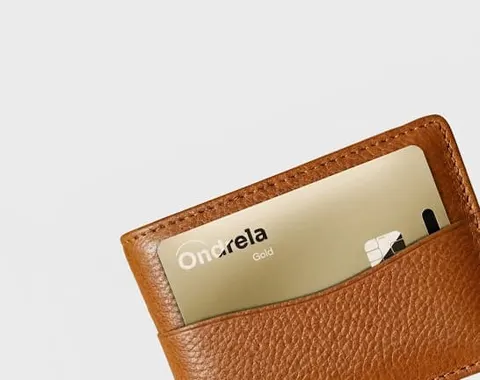
Beeping trackers are mostly a symptom of the wrong setup: a tag on someone else's account, a tag loose in a shared bag, a tag nobody remembers. The Ondrela tracker card is the tracker we recommend because it's made for the right setup from day one: it goes in your wallet, pairs with your phone's built-in Find My or Find Hub, and does its real job, warning you before you lose the wallet and ringing on command when it's hiding.
- Credit-card thin, so it slides into any card slot without bulk.
- Works with Find My on iPhone and Find Hub on Android, with no extra app and no subscription.
- Left-behind alerts and ring on command, so a forgotten wallet is caught before it's lost.
- Rechargeable on any wireless pad, with around six months per charge stated by the maker.
The 4-card bundle at $99.96 ($24.99 per card) is the most popular choice, enough for your wallet, keys, bag and a partner's wallet; 1 card is $44.99, 2 are $69.98 and 3 are $89.97, with fast standard shipping and a 60-day return policy. Get every detail in our full review or compare bundles on the home page.
Frequently asked questions
Why does my AirTag keep beeping?
Most often because it has been away from its owner's iPhone for a while and is being moved. Apple designed AirTags and Find My network accessories to play a sound in that situation so people nearby can notice them. It also chimes when you set it up or replace the battery, and when someone uses Play Sound in the Find My app.
Why is my AirTag making noise when I have it with me?
Check whose Apple Account it is paired to. If it belongs to a partner or family member, or you are carrying it away from the iPhone it is paired with, it can count as separated from its owner and play a sound when moved. Keep the tag paired to the phone that travels with it, or use Family Sharing so alerts can be turned off for a borrowed item.
How long before a separated AirTag starts beeping?
Apple only says “a period of time”. When AirTag launched in 2021 it was three days; a firmware update later in 2021 shortened it to a randomized window that has been widely reported as 8 to 24 hours.
Can Android phones detect an AirTag that is following them?
Yes. Since Apple and Google rolled out cross-platform unwanted-tracking alerts in May 2024, Android 6.0 or later can notify you when an unknown tracker is moving with you, and you can play a sound on it to find it.
Does a low battery make an AirTag beep?
No beeping is needed: low battery is shown as a notification and in the item's details in the Find My app. Rechargeable card trackers such as the Ondrela card simply go on a wireless charging pad when they run low.
Do card trackers like Ondrela follow the same rules?
Yes. Trackers that work with Apple Find My or Google Find Hub follow the same unwanted-tracking protections, including alerts and sounds when an unknown tracker travels with someone. Paired to your own phone and kept in your own wallet, it stays quiet and simply helps you find your things.
Sources: Apple Support, “What to do if you get an alert that an AirTag, set of AirPods, Find My network accessory or compatible Bluetooth location-tracking device is with you”; Apple Newsroom, “Apple and Google deliver support for unwanted tracking alerts in iOS and Android” (May 2024); MacRumors (April 2021) and public AirTag firmware history for the separation delay.